An AI Actions app exposes typed, callable operations to AI Agent Studio. Each operation is declared in actions.json and implemented in a callback in server/server.js. You can add AI Actions to a new app or extend an existing custom app, including apps that already have a front-end app folder.
AI Agent Studio is the workspace where admins and agents build and deploy AI agents powered by Freddy AI. When an agent workflow needs to run an operation, such as resetting a password, updating a record, or applying custom business logic, it runs the API action block. An AI Actions app supplies the operations that step can call.
You declare what each action accepts and returns in actions.json, implement callback logic in server/server.js, and optionally connect to external APIs through request templates. After you publish and install the app as a custom app, your actions appear under Your apps in AI Agent Studio, where workflow admins add them to agent workflows.
Note:AI Actions apps can currently be published only as Custom apps. Publishing AI Actions apps as Freshworks (public) apps is not supported at this time.
How AI Actions work
When a workflow runs an action, the platform validates input against your schema, invokes the matching callback in server/server.js, and returns a typed response. Callbacks can run any server-side logic. External HTTP calls through request templates are optional.
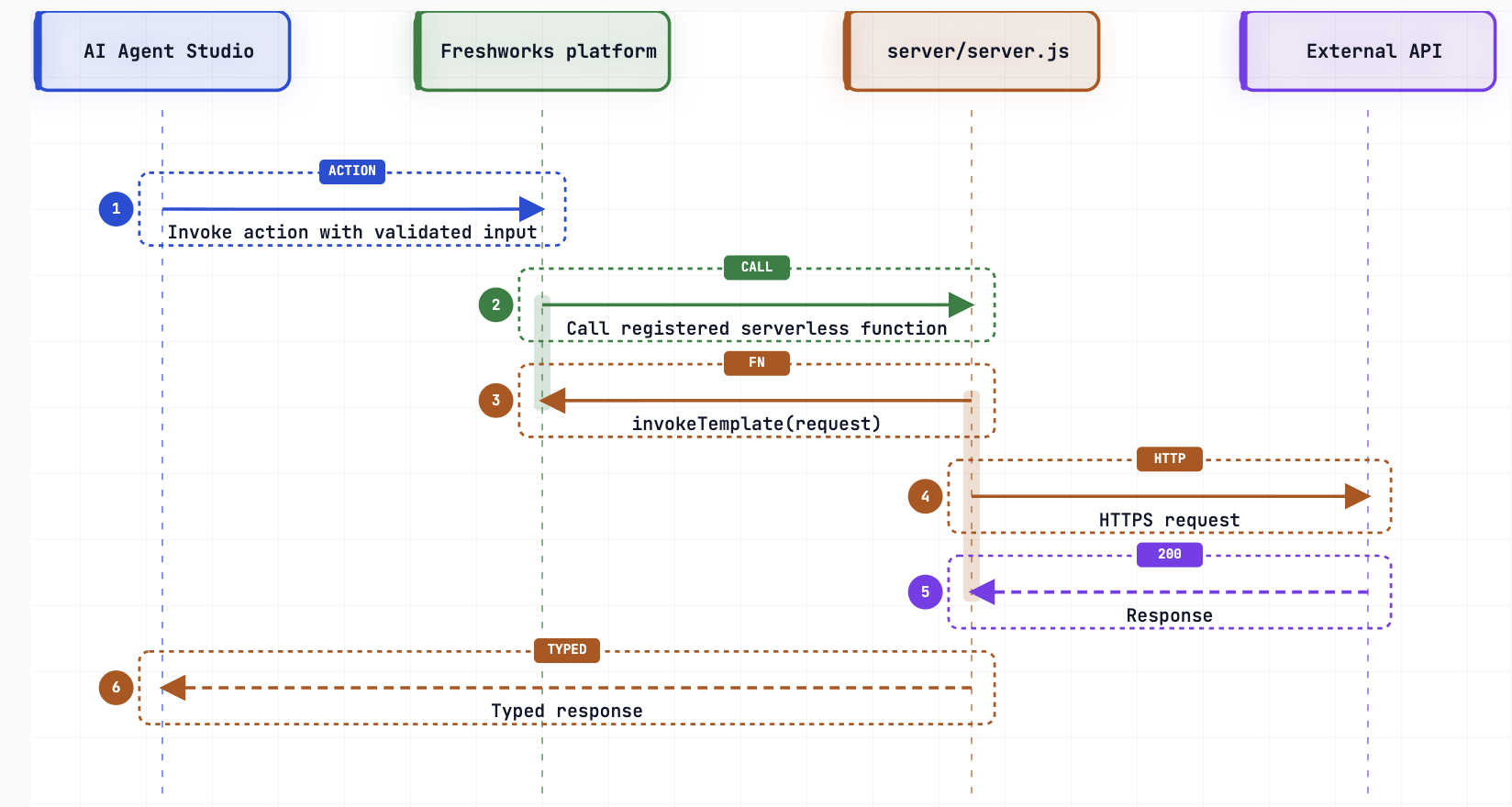 AI Actions invocation flow
Each action requires aligned names in two places:
- The action key in actions.json
- The exported callback in server/server.js
If these names do not match, fdk validate or runtime invocation fails. If you use request templates, register every template you invoke in manifest.json > modules.common.requests.
Supported subscriptions
AI Actions are available in AI Agent Studio on the following subscriptions:
- Freshsales Suite
- Freshdesk Omni
- Freshservice ESM
- Freshservice ITSM
- Freshchat
AI Actions are not available on the following products or subscriptions:
- Freshcaller
- Freshsales Classic
- Freshdesk Legacy
- Freshservice MSP
Next steps
- Configure AI Actions: Step-by-step reference to enable your app for AI Agent Studio.
- Use actions in AI Agent Studio (after you publish and install): See how actions appear in the live UI and validate them with Test API.